
LaTeX on your own computer
Deft is a desktop LaTeX editor. It renders your source as you type and compiles it to PDF with a compiler that comes inside the app. No TeX installation, no account, no browser tab. Free for Mac, Windows and Linux.
Compiles out of the box
Deft comes with Tectonic, a self-contained TeX engine. Open a .tex file, press Ctrl+Enter (Cmd+Enter on a Mac) and you have a PDF. Packages download the first time a document needs them and stay put, so after that you can compile offline.
The whole Windows installer is 22 MB, compiler included.
Or the TeX you already have
Point Deft at the latexmk from your TeX Live, MacTeX or MiKTeX and pick pdfLaTeX, XeLaTeX or LuaLaTeX. BibTeX and biber run when the document needs them, and Deft respects your project’s latexmkrc.
Source that reads like the page
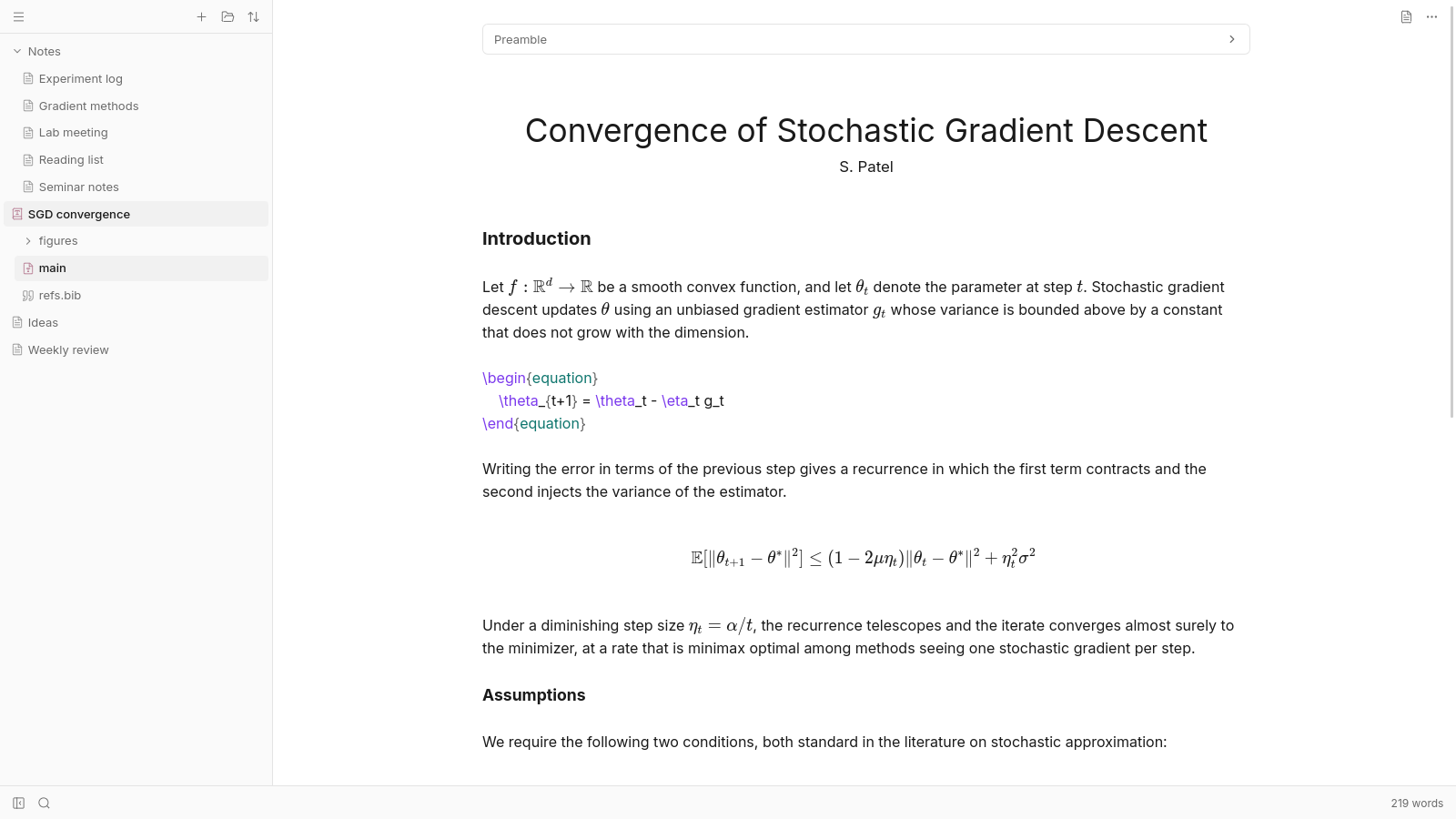
Sections, emphasis, lists, footnotes, tables and the title block look the way they’ll print, and figures show at the width \includegraphics asks for. Math is typeset as you write it. Put the cursor inside anything to see and edit its markup. Move on and it’s hidden again. The preamble folds out of the way.
Don’t want to see markup at all? There’s a mode that keeps it hidden while you format from the menu or with the usual shortcuts. Plain source is one switch away.
Errors that take you to the line
When a compile fails, the problems are listed in a panel and marked in the text. Click one to jump to the line that caused it. If your document needs biber, Deft tells you.
Long documents
Split a thesis or a book across files with \input and \include and it still compiles from the main file. Deft finds that file by itself, or you name it with % !TeX root. The outline shows the whole project and jumps to any section.
The PDF, inside the app
The compiled PDF opens in place of the editor with page and zoom controls, and exports wherever you want it. The .aux, the .log and the rest of the build’s leftovers are kept outside your folder, so it stays as clean as you left it.
Still your .tex
Deft edits plain .tex files and never rewrites them into something else. They keep working with Git, journal templates and any other editor. Start a new document from a template, or bring your own preamble.
Your notes in the same place
The folder that holds your papers can hold your notes too. Deft does Markdown with the same live rendering, math included. More about notes.
Free, with no account
Deft is free and never asks who you are. Sync is an optional add-on that keeps a folder the same on every computer, end-to-end encrypted.
Download Deft for Windows, macOS or Linux.